
Blog
HiBy Digital M500 x Hatsune Miku 4G Review — Headfonics

Marcelo reviews the HiBy Digital M500 x Hatsune Miku 4G, a themed mobile data-capable Android 14 DAP with up to 449 mW of output power. It is currently priced at $349 for the 4G version and $319 for the WiFi-only version.
Disclaimer: This sample was sent to me in exchange for my honest opinion. Headfonics is an independent website with no affiliate links. I thank HiBy Digital for their support.
You can click here to read more about the HiBy products we have previously featured on our website.
This article follows our latest scoring guidelines, which you can read in more detail here.
HiBy Digital M500 x Hatsune Miku 4G Review
Summary
Unlike some DAPs I've heard, which have very good technical performance but sound boring, dry, and flat to my ears, the HiBy Digital M500 X Hatsune Miku 4G sounds musically engaging and three-dimensional with plenty of both macro and micro details.
Pros
Transparent and coloration-free sound.
Big soundstage and airy treble.
Never gets hot.
Cons
Terrible camera output quality.
HiBy is one of my favorite brands for DAPs (digital audio players).
I have heard or reviewed some of their DAPs and find that they sound very good, including the HiBy R8 II, HiBy R3Pro II, and the HiBy R6 III. I also reviewed their beautiful-sounding flagship Zeta IEM and their wonderful-sounding FC6 dongle DAC.
I’m very familiar with and love the Evangelion movies and show, which are among the versions on HiBy’s R4 DAP. I was not very familiar with Hatsune Miku, as I only watched anime when I was much younger, and Hatsune Miku is a more recent character.
Upon research, it turns out Hatsune Miku is not originally an anime character in an anime show at all, as I previously thought.
From what I’ve gathered in my research, Hatsune Miku is a world-renowned Japanese virtual singer, developed by Crypton Future Media and launched in 2007, who serves as a mascot for the Yamaha Vocaloid 2, 3, and 4 singing voice synthesis technologies.
To make it short, it is a character that can be used by composers who can’t sing to sing their songs.
The fun-looking HiBy Digital M500 X Hatsune Miku 4G, DAP sells for $349. But I will refer to it from now on as the M500 4G because of its very long name.
All these nice-looking designs and colors have no effect on sound quality, which is most important to most audio enthusiasts.
How does the M500 4G perform and sound? Or more importantly, how does it compare to other nice DAPs, including the Shanling M3 Plus and the ONIX Tocata XM2? Let’s find out.
Features
The M500 4G is a feature-rich DAP. Aside from being customizable by installing new apps, it has a reasonably fast processor that handles most Apps with ease.
It has an in-depth, fully loaded Hatsune Miku-themed UI that is very well-integrated throughout.
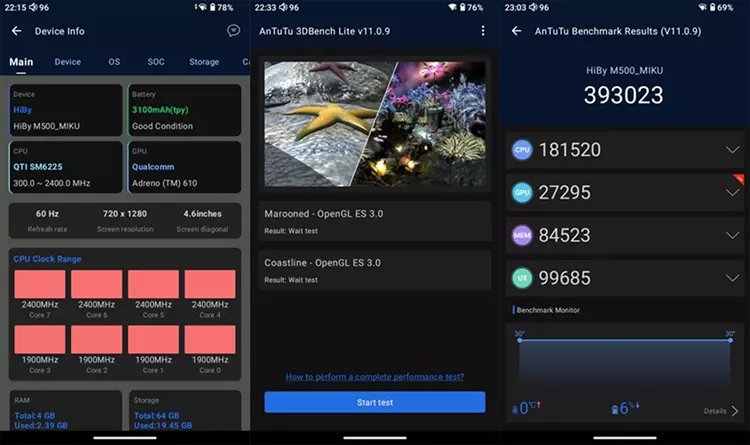
The M500 4G uses a Snapdragon 680 SoC, which is not the fastest or latest processor, but for DAP use, it is more than adequate, and I have never experienced any annoying lag or delays with this DAP. It has 4 GB of memory and 64 GB of internal storage.
Another very important feature that enables the online use of the M500 4G almost anywhere is its 4G connectivity, which is enabled by installing a data-compatible SIM card.
Other features include a 5-inch touch display, Wi-Fi, Bluetooth, a built-in camera, dual microphones, dual speakers, and FM Radio. Additionally, the M500 4G can also act as a mobile hotspot.
DAC
The M500 4G uses a dual Cirrus Logic CS43198 DAC implementation that supports up to DSD 512 natively and PCM 768 kHz 32-bit decoding.
Four SGM8261 op-amps drive the M500 4G’s amplification with 3.5 mm and 4.4 mm outputs.
The SGM8261 is a high-performance, bipolar-input, ultra-low noise operational amplifier (op-amp) manufactured by SG Micro. It is designed for high-voltage, high-fidelity (HiFi) audio applications, featuring ultra-low noise and distortion.
The M500 4G has a maximum output of 123 mW into its single-ended 3.5mm connection and 449 mW into its balanced 4.4mm output jack, which is moderate compared to higher-end DAPs but plenty of power for IEMs and efficient headphones.
Design
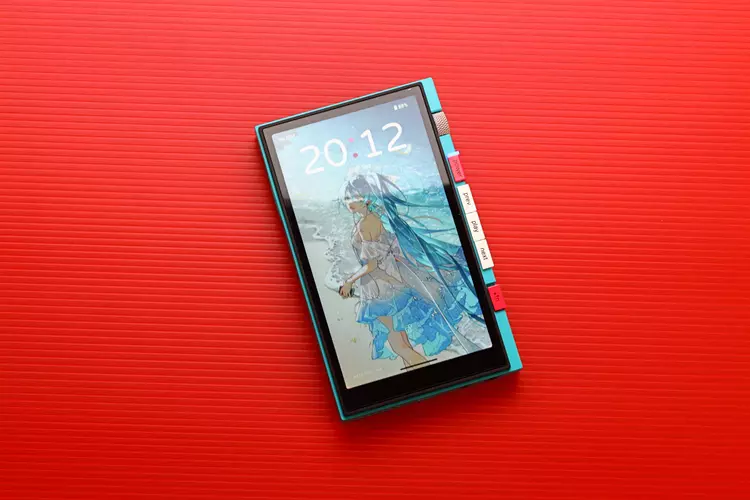
The M500 4G features a summer sea breeze-themed design language by renowned illustrator TID, who was specifically commissioned to design and illustrate the Hatsune Miku collaboration key visuals.
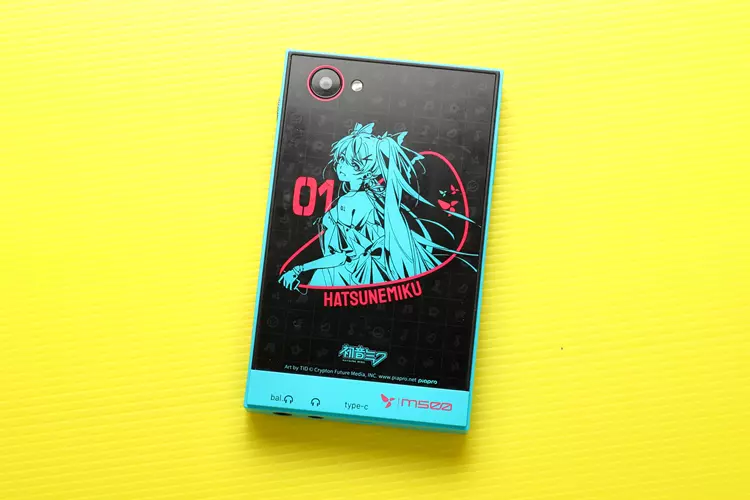
This is a meticulously designed DAP based on Miku’s signature color, blue-green. The two pink buttons accent the design, while the glass back panel shows a geometric pattern with graffiti-inspired graphics.
The M500 4G’s medium-sized body of 128 x 76 x 15 mm and a weight of 208 grams are in the sweet spot for DAPs. The M500 4G offers a good balance of size, weight, output power, controls, functions, and battery life.
The screen is a 5-inch, 1280 x 720-resolution touchscreen that is very responsive, with good contrast, viewing angles, color reproduction, and brightness.
The specified resolution may not be very high, but when viewing the wallpaper and the contents of apps like Facebook and YouTube, the photos and videos look clear and crisp.
The black levels and backlight bleed aren’t as good as those on my phone’s OLED screen. I estimate the refresh rate is no more than 60 Hz; it could be between 30 and 60 Hz.
The M500 4G’s camera is lackluster: focusing is slow and inaccurate by today’s standards, and photo quality is poor.
There is a lack of dynamic range, with plenty of bright areas being blown out and dark areas being black. The images are very soft and a little underexposed.
Video quality has better highlight handling; however, the video is dark and underexposed, presumably to protect the highlights. I must say the camera performance is poor.
I/O
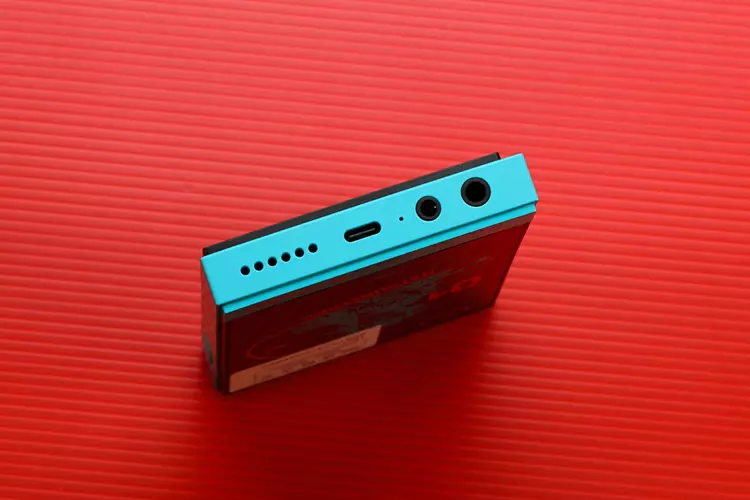
The SIM and memory card slots are on the left, while the speaker and mic are at the top.
Another speaker and mic are at the bottom, along with the USB-C port, which serves as a charging and data transfer port, a 3.5 mm single-ended jack, and a 4.4 mm balanced output jack.
Putting the headphone output jacks at the bottom is fine, but I personally prefer them on top so I can rest the DAP on my tummy while lying down, with the screen facing me. The M500 4G allows me to rotate the screen, but still.
Controls
All the controls, including a volume knob, power/screen-off button, forward, backward, pause/play button, and a control-lock slide switch, are conveniently located on the right side. Making it easy for me to control the M500 4G.
All the knob and switches have a very good feel to them, neither too soft nor too stiff to manipulate, just right. And the feel quality is nice. There is no rattling sound when I shake the M500 4G.

Battery Life
The M500 4G is rated for up to 26 hours of use and 558+ hours of standby time.
In my test, I let it play continuously with an IEM connected via a 4.4mm cable at my normal listening volume, which is loud. I got from 100 percent down to 90 percent in 1.5 hours.
Therefore, I can safely say that the M500 4G can last 12 to 16 hours on a fully charged battery under these conditions.
I’ve been playing with the M500 4G during my battery test with the gain set to high, the screen at full brightness, and WiFi on.
Perhaps if I used only the 3.5mm connection at low gain and low volume with the screen off all the time and WiFi off, the 26-hour rating could be achieved.
The M500 4G works with my PD, VOOC, and QC3.0 chargers. I never fully drain the battery to protect its longevity. I got from 44 percent to 95 percent in one hour of charging. I estimate it will take about 2 hours to fully charge the M500 4G from a completely dead battery.
During prolonged use, listening, charging, burn-in, and AnTuTu benchmarking, the M500 4G never got hot, just pleasantly warm.
Packaging & Accessories
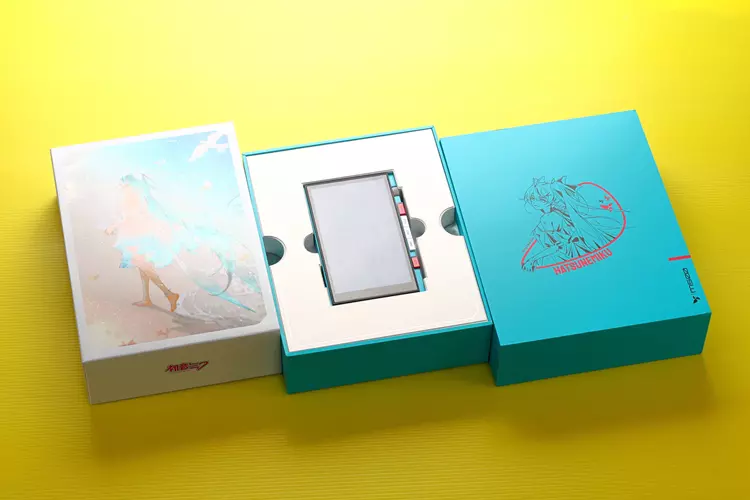
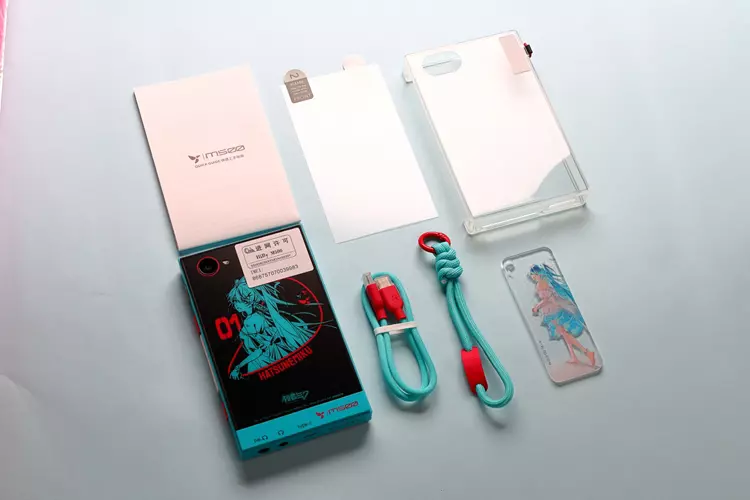
I had a good unboxing experience with the M500 4G, featuring elegant, high-end packaging.
The box opens easily with the DAP, and its accessories are nicely protected and separated inside with foam and cardboard dividers. The box exterior features a foil-card-inspired finish that creates a metallic texture.
The big 223 x 174 x 60 mm box includes the M500 4G DAP, a clear PU case, a user manual, an extra screen protector in addition to the one already installed, a color-matched lanyard, a color-matched USB-C cable, and an acrylic Hatsune Miku hangtag.
My review sample came with a well-fitting, clear PU case and a metal lanyard tag. However, the M500 4G has an optional PU leather case that looks much better and is available separately.
Software Impressions
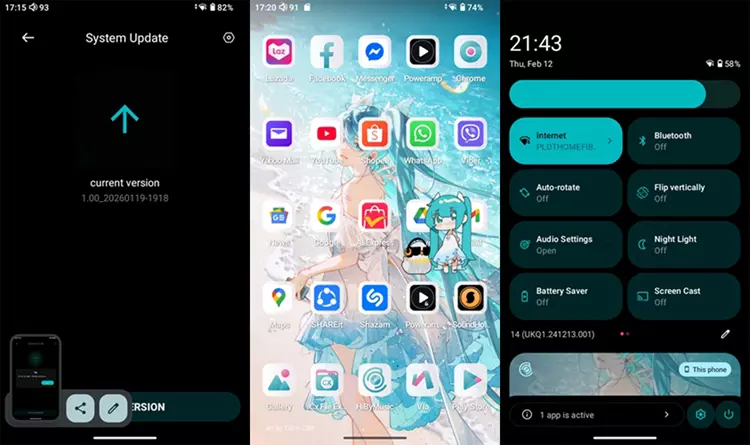
The three-finger downward gesture lets me take screenshots shown in this review. My M500 4G is running the latest version of HiBy OS for Android 14. The Google Play Store app is already installed and runs natively on the M500 4G; unlike some DAPs I’ve tried.
There is a pre-installed app called Via that lets me download and install AnTuTu for benchmark testing.
In addition, I also downloaded and installed AnTuTu 3D Bench, which is required to complete the test. I got 393,023 AnTuTu V11.0.9 Benchmark result.
Swiping down the screen twice will show the small gear icon, which stands for settings. There you’ll find many settings you can adjust, including audio settings with two gain settings and five digital filter settings, including a NOS (non-oversampling) filter.
The audio setting can also be found in the drop-down menu by swiping down once, along with WiFi, Bluetooth, night light, and other usual Android settings.
Navigation
Thanks to the M500 4G’s Snapdragon 680 processor, navigation is fast and lag-free, though it may not be as quick as my flagship Android Phone with the latest and most powerful processor.
The M500 4G’s operation is smooth. By default, navigation is set to gesture, but can be changed to 3-button navigation.
There is an animated Hatsune Miku that is always on top of the screen but can be moved anywhere, and it reacts when you press it. There is also a voice when you plug or unplug the IEMs or headphones, and when you turn the DAP on or off.
I find it challenging that whenever I adjust the volume, an animation overlays the volume control, distracting me while I’m enjoying the music. Fortunately, this can be turned off in the settings.
You can also double-tap the screen to wake it, but this feature must be turned on in settings; it is off by default.
Local Playback
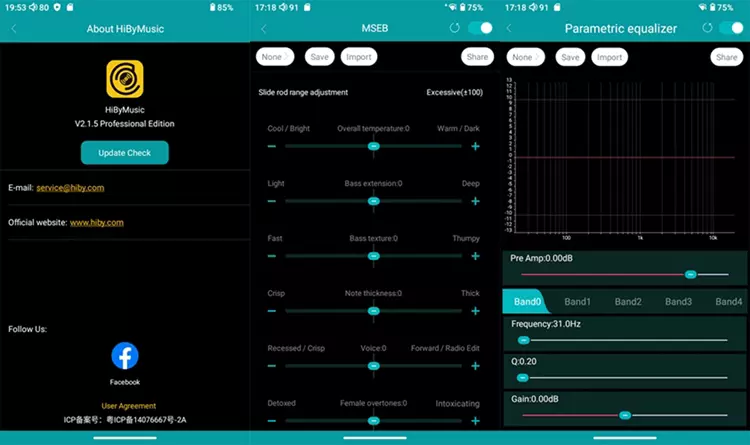
As a native music player, HiBy Music works flawlessly, with no noticeable UI lag. HiBy Music Player includes features HiBy is known for, such as MSEB and PEQ, along with a graphic EQ. Unfortunately, it does not play some music formats in my library, particularly MP4 videos.
All the third-party music players and streaming apps are available via the Google Play Store.
Since the HiBy Music Player doesn’t play MP4 tracks, which I have quite a few of, from YouTube video downloads, I installed the PowerAmp music player app, and it works flawlessly with no lag or sluggishness.
All the buttons work as they should: play/pause, skip forward and back, and the long press for fast forward and reverse.
USB Audio Player Pro (UAPP) music player App works well, as if it were a native player, with no issues or lag.
I also play MP4 files from YouTube videos as audio only. All the buttons work as they should: play/pause, skip forward and back, and the long press for fast forward and reverse.
Streaming Apps
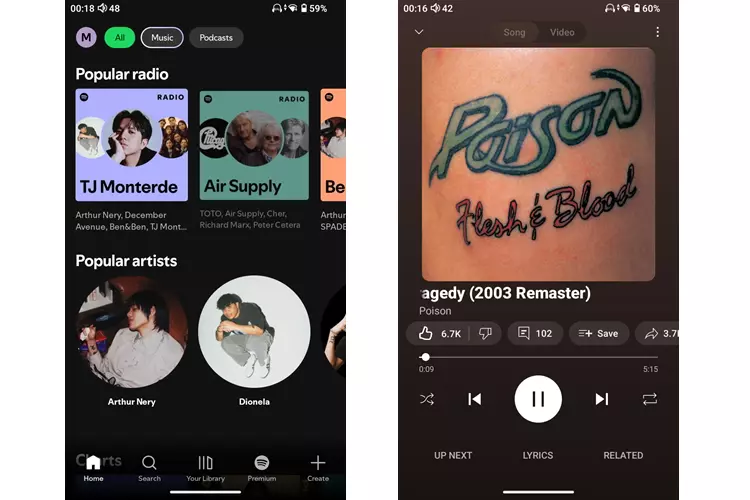
Not only does Spotify on the M500 4G sound good, but it also works well and responds quickly.
The only limitation is that the controls are forward-only, and I cannot scrub through the progress bar because I have a free Spotify account rather than the premium version. This is not the fault of the M500 4G.
YouTube works flawlessly, with no lag or signs of incompatibility or instability. All physical buttons function as intended, and the UI is perfectly functional.
Sound Impressions
I completed my standard 24-hour burn-in for review units while running battery and charging tests, installing apps, and learning to operate the M500 4G.
All audio settings in the operating system and music player apps are set to their defaults. Which means no sound enhancement programs are used.
Of the five digital filter settings, I used the default fast roll-off, low-latency setting because I prefer it to the other filters, including the NOS (non-oversampling) mode.
For the sound evaluation and comparison, I use my DUNU Falcon Ultra, QoA Martini, and Tipsy M5 IEMs, plus the Sennheiser HD 6XX, FiiO JT3, and the MOONDROP Horizon headphones.
Summary
My expectations for the M500 4 G’s sound quality were not very high. Based on its design, I see it as a fun-oriented DAP with many features, not focused on audio quality above all else, before taking a listen.
That said, I was very surprised to hear the M500 4G’s very transparent, coloration-free, and neutral sound signature with a very flat perceived frequency response.
There is no warmth at all, as if the sound isn’t colored by fat bass and rolled-off treble. Which I like because I prefer a neutral, transparent sound to a warm, veiled one.
The bass is neutrally presented with good punch and depth. It is not the tightest bass I’ve heard, but it’s not boomy either. It is in between, with good clarity, control, and articulation.
The M500 4G’s midrange is clean and lush, with a very neutral, even-handed presentation. The instrument note weight is neither too thick nor too thin, and there is no upper midrange forwardness or recession. Both the male and female vocals are equally well represented.
I hear plenty of details in the treble. The M500 4G has a high perceived resolution and delivers very clean detail rendition.
The treble sounds airy and extended; there is no perceived roll-off in the upper treble. It sounds transparent, with no veiling, and the fine micro-details shimmering in the background are clearly audible.
Staging & Dynamics
The M500 4G features a spacious, wide, and high stage with very good depth for the instrument decay to fall into. This makes the overall presentation feel big and clean, giving me a natural, convincing sense of the music’s high-ceilinged ambiance.
I like the immersive soundstage, which forms a spherical soundscape around me. This also translates to how well the imaging is presented. The imaging is holographic, especially when paired with an IEM capable of good holography.
There is a very good lateral separation of the instruments, and the main vocals have good edge definition in the center. I hear a very good front-to-back layering of the instruments and vocals.
This results in an apparent spatial separation of the elements in the music, making it easy for me to choose an instrument for analysis. Yet, the overall sound is natural rather than clinical.
The M500 4G’s rendition of Transients and dynamics is crisp and fast, contributing to the sound’s clarity and clean decay. Not only are the macro-dynamics good, but the micro-dynamics are also good.
This allows me to easily perceive the tiny difference in how much energy the drummer or the instrument player puts into each stroke when paired with a capable IEM.
Click on page 2 below for my recommended pairings and selected comparisons.
Related Posts

Strauss & Wagner Review: Silphase Silicone Eartips

Cayin T201 Review — Headfonics

Luxsin X8 Review — Headfonics

FiiO EH11 Review – Headfonia

Meze ASTRU Review: A New Star for High-End In-Ear Monitors

FiiO SNOWSKY ECHO Review — Headfonics

Audeze LCD-5s Review — Headfonics

Sony WF-1000XM6 Review: Has Sony Reclaimed the TWS Crown?

Noble FoKus Prestige Encore Review

HIFIMAN Arya WiFi Review — Headfonics

Audeze Maxwell 2 Review: Your Next Gaming Headset Upgrade
